10. Final Project Instructions and Rubric
Final Project Instructions and Rubric
Meet-Up Event Planner
Prepare for this project with Building High Conversation Web Forms and Web Tooling and Automation.
Requirements
You do not need to create a functioning back-end or save user information. Only the form components themselves and their performance will be evaluated.
1) You do not need to create a real back-end or save user information, but the app must provide a form for users to create an account. Account creation should include, but is not limited to:
- Name
- Email address
- Secure password (with character and length requirements)
- Optional public biographical information (such as employer, job title, birthday, etc)
2) The app should allow users to create a new event. Each event should, at a minimum, allow a user to set:
- Name of the event
- Type of the event (birthday party, conference talk, wedding, etc.)
- Event host (could be an individual’s name or an organization)
- Event start date and time
- Event end date and time
- Guest list
- Location
- Optional message to the guests with additional information about the event
3) The app should display events that have been created.
Tips, Tricks, and Advice
- You may find that you want to save user information in some way, as opposed to just hard-coding in a few events to meet the “display events” requirement. You could accomplish this by using localStorage or by using a “back-end as a service” platform like Firebase.
- You can use any framework you’d like - or don’t! It’s up to you.
- Need some help testing your site with a screen reader? Check out this video from our Responsive Images course for some tips.
- Use this checklist as a reference to help you throughout this project.
Evaluation
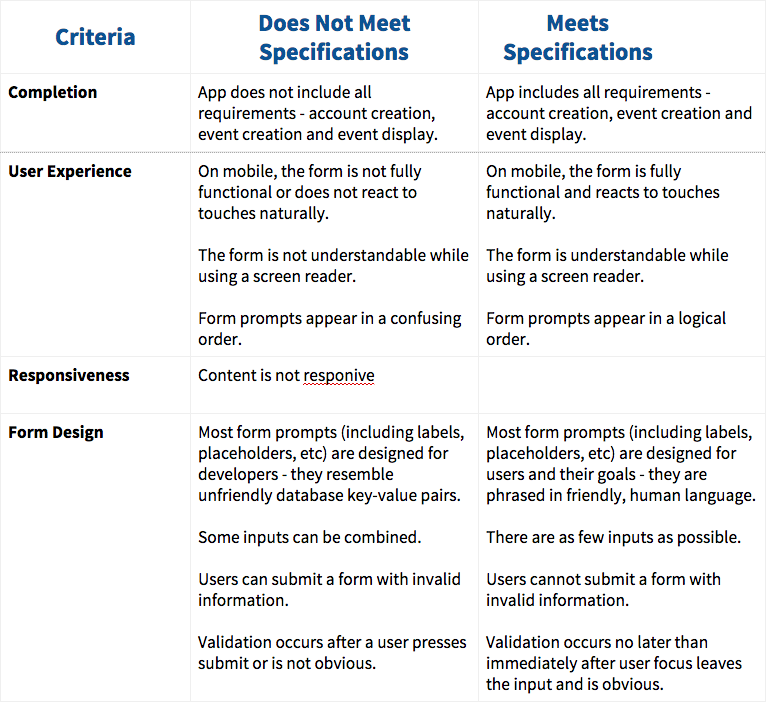
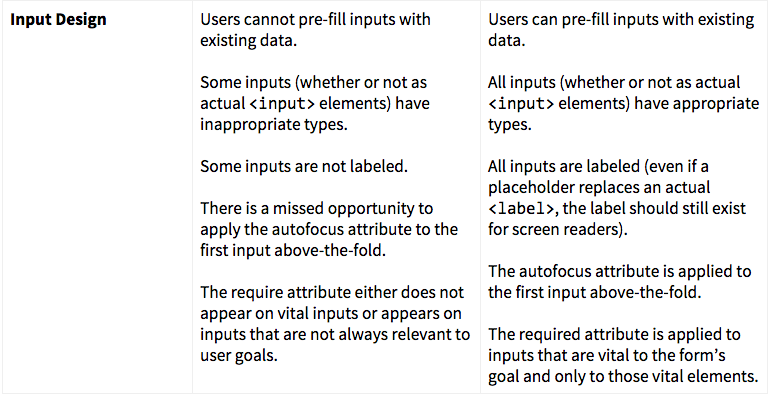
Your project will be evaluated by a Udacity reviewer according to the rubric below. Be sure to review it thoroughly before you submit. All criteria must "meet specifications" in order to pass.